
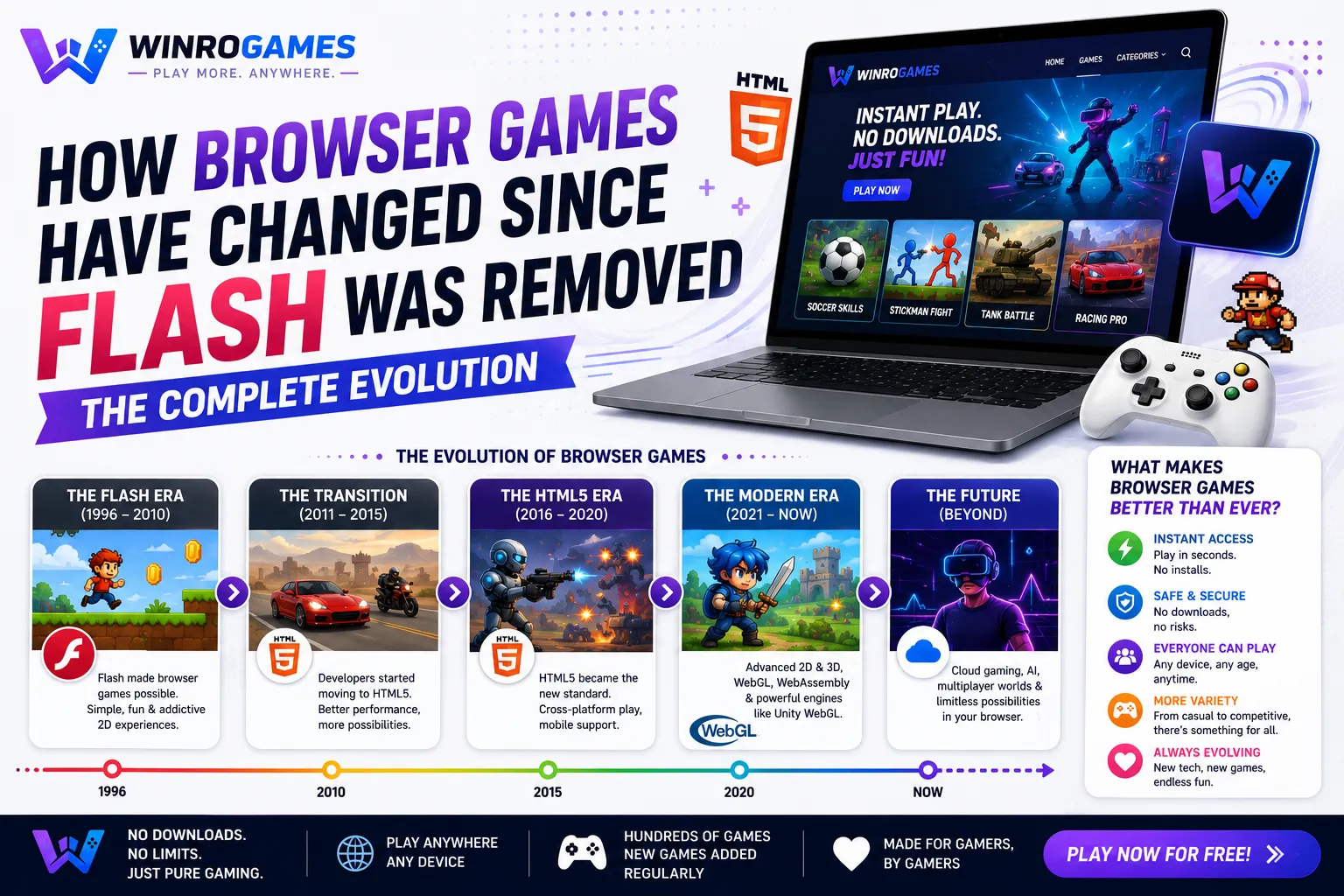
The evolution of how browser games changed after Flash deprecation represents one of the most significant technical transformations in web history. When Adobe formally ended support for Flash Player on December 31, 2020, critics predicted the extinction of browser-based gaming. Instead, modern open web standards—specifically HTML5 Canvas, WebAssembly (Wasm), and WebGL 2.0—stepped in to replace proprietary browser plugins, enabling high-performance graphics, lower power consumption, and native cross-platform execution directly inside browser sandboxes.
The Decline and Deprecation of Adobe Flash
During the late 1990s and 2000s, Macromedia and Adobe Flash powered web animation and interactive games. Portals like Newgrounds, Kongregate, and Armor Games hosted millions of Flash creations. However, Flash suffered from fundamental architectural flaws:
- Severe Security Vulnerabilities: Running an external binary runtime plugin inside the browser created constant attack vectors for arbitrary code execution and memory corruption exploits.
- High Battery and CPU Overhead: Flash lacked low-level hardware shader pipeline integration, forcing software-rasterized vector calculations that drained laptop batteries and caused severe thermal throttling.
- Mobile Incompatibility: Steve Jobs' 2010 public essay Thoughts on Flash confirmed Apple would never allow Flash on iOS, creating a permanent mobile divide that sealed Flash's fate.
The Modern Web Gaming Stack: HTML5, WebAssembly, and WebGL
Today, web browser games no longer require third-party plugins. Instead, modern browsers treat interactive games as first-class citizen applications through three complementary web standards:
1. HTML5 Canvas 2D Context
The standard HTML5 <canvas> element provides a scriptable bitmap drawing surface. Developers use standard JavaScript to render 2D sprites, geometric shapes, and typography at consistent 60 Hz display refresh rates. Classic titles like our 2048 puzzle game run entirely within lightweight Canvas 2D contexts.
2. WebGL 2.0 (Web Graphics Library)
WebGL brings OpenGL ES 3.0 graphics API capabilities directly into JavaScript. Browsers can access GPU shaders, texture buffers, and depth testing, allowing complex 3D rendering directly in browser tabs without plugins.
3. WebAssembly (Wasm)
WebAssembly enables code written in C, C++, or Rust to execute inside the browser at near-native binary speed. Popular commercial game engines like Unity and Godot compile directly to Wasm, allowing complex physics calculations and memory management to run client-side with minimal latency.
Audio Modernization: The Web Audio API
Beyond visual graphics, audio architecture underwent a parallel revolution. Legacy Flash games relied on embedded MP3 audio streams that lacked spatial positioning and dynamic filtering. The W3C Web Audio API introduced a modular audio routing graph inside JavaScript. Developers can attach directional positional panners, biquad frequency filters, and dynamic gain nodes, allowing web games to render true 3D spatial soundscapes directly through player headphones with zero external drivers.
Technology Comparison: Flash vs Modern Web Standards
Review the architectural differences between Flash and current web technologies:
| Feature | Adobe Flash (Legacy) | Modern Web Stack (HTML5 / WebGL / Wasm) |
|---|---|---|
| Plugin Requirement | Mandatory external runtime | None (Native browser standards) |
| Mobile Execution | Incompatible with iOS and Android | Fully responsive on all mobile browsers |
| Hardware Acceleration | Limited software rasterization | Direct GPU shader pipelines via WebGL |
| Security Sandbox | Frequent system-level memory exploits | Strict browser memory containment |
| Distribution Format | Proprietary compiled .SWF files | Open web standards (JS, Wasm, HTML5) |
ActionScript to WebAssembly: The Bytecode Revolution
Adobe Flash relied on ActionScript, an interpreted object-oriented language that executed inside the proprietary Flash Player virtual machine. While powerful for 2005, ActionScript was single-threaded and heavily bottlenecked by garbage collection pauses. WebAssembly (Wasm) revolutionized this paradigm by establishing a standardized open binary instruction format backed by W3C, Google, Apple, and Mozilla.
Unlike ActionScript, WebAssembly operates with structured linear memory and compact binary payloads that decode at hardware speeds. Game developers write code in high-performance native languages—C++, C#, or Rust—and compile directly into .wasm modules. This allows complex physics engines, 3D character skeletons, and pathfinding matrices to run in browser tabs with near-native CPU efficiency.
The Next Frontier: WebGPU and Direct Hardware Shaders
While WebGL brought OpenGL ES 3.0 to the browser, the web platform continues to evolve toward WebGPU. Designed as the modern successor to WebGL, WebGPU mirrors low-level desktop graphics APIs like Vulkan, Apple Metal, and Microsoft DirectX 12. WebGPU introduces compute shaders directly to browser tabs, enabling complex procedural world generation, machine-learning physics simulations, and advanced global illumination without third-party plugins.
Canvas 2D vs DOM Tree Rendering Performance
A fundamental breakthrough in modern web gaming is the separation of game rendering from the browser's Document Object Model (DOM). In early HTML games, developers attempted to move standard <div> elements across the screen. However, updating hundreds of DOM nodes forces the browser engine to perform continuous reflow and recalculate layout trees, causing severe frame drops.
The HTML5 Canvas API bypassed this bottleneck by introducing an immediate-mode bitmap drawing context. Instead of manipulating individual HTML elements, JavaScript writes directly to a pixel buffer that is composited to the screen via hardware GPU shaders. This allows browser games to render thousands of moving sprites, particle emitters, and animated background layers at a locked 60 Hz display cadence.
WebRTC Data Channels and Peer-to-Peer Browser Multiplayer
Modern browser multiplayer games no longer depend exclusively on centralized client-server bottlenecks. WebRTC (Web Real-Time Communication) introduces direct peer-to-peer data channels between browser instances. WebRTC packets travel over UDP with minimal encryption overhead, enabling real-time cooperative play, voice communication, and physics state synchronization with latencies comparable to standalone desktop titles.
Cross-Origin Isolation and SharedArrayBuffer Multithreading
Modern browser game performance took a massive leap forward with the stabilization of Cross-Origin Opener Policy (COOP) and Cross-Origin Embedder Policy (COEP). Enabling these security headers unlocks SharedArrayBuffer in JavaScript, allowing multiple WebAssembly worker threads to read and write directly to shared memory blocks without serialization overhead. This enables browser titles to execute complex multi-core physics and audio mixing previously restricted to compiled desktop software.
Preserving the Golden Era of Flash Gaming
While modern development has transitioned to open web standards, preserving thousands of historical Flash games remains vital. Projects like Flashpoint Archive and open-source WebAssembly emulators like Ruffle run legacy ActionScript files natively by compiling Rust to WebAssembly, ensuring classic web art remains accessible without security compromises.
Experience Modern Web Gaming on WinroGames
WinroGames is built entirely on modern, plugin-free web standards. Explore our clean implementations:
- Play deductive grid puzzles in our client-side Sudoku game.
- Read more about frictionless browser gaming in our guide on why HTML5 games are booming.
- Find more zero-install titles in our curated list of free games with no download required.
- Learn about our team's engineering standards on our About WinroGames page.
Frequently Asked Questions
Can you still play old Flash games today?
Yes. Web-based Flash emulators like Ruffle allow browsers to run classic .SWF games securely using WebAssembly without installing legacy Flash plugins.
Are HTML5 browser games safe to play?
Yes. Modern web games run inside the browser's strict sandboxed environment, preventing them from accessing local files or installing unauthorized background software.
Do HTML5 games work on mobile phones?
Yes. Modern web games automatically adapt to touchscreen events and viewport dimensions, allowing identical gameplay on smartphones, tablets, and desktop computers.
What programming languages are used to build modern browser games?
Most modern web games are written in JavaScript, TypeScript, or compiled from C++, C#, and Rust into WebAssembly for high-performance physics execution.
Will WebGPU replace WebGL in the future?
WebGPU is the emerging successor to WebGL, offering lower-level GPU control modeled after Vulkan, Metal, and DirectX 12, unlocking advanced compute shader capabilities in web browsers.
Garbage Collection and Memory Constraints in Web Browsers
Unlike native executable engines, browser games share memory allocations with the browser rendering engine and running tabs. Heavy textures and uncompressed audio buffers can trigger aggressive JavaScript garbage collection cycles, causing momentary frame stutters. Modern HTML5 game developers manage this by pre-allocating memory pools, utilizing compressed WebP texture atlases, and leveraging Web Workers to run physics calculations off the main UI rendering thread.
Sources & Historical Documentation
- Adobe Inc. Adobe Flash Player End of Life General Information Page (2021).
- Jobs, Steve. Thoughts on Flash. Apple Inc. Public Letter (April 2010).
- World Wide Web Consortium (W3C). WebAssembly Core Specification 2.0 (2024).